
You are using an out of date browser. It may not display this or other websites correctly.
You should upgrade or use an alternative browser.
You should upgrade or use an alternative browser.
need help but can't post pics.
- Thread starter ken1977
- Start date
- Status
- Not open for further replies.


parkj5
New member
I use photo bucket man

It wont upload. Idk
---------- Post added at 10:27 AM ---------- Previous post was at 10:26 AM ----------
I upload on other forms idk.
Hire do you upload on other forums. Are the pics on your PC? If they are, click on "go advanced", click on manage attachments and upload files
Joel
New member
Sometimes it takes a while to load. The first time I tried posting pics it would just think and think and they wouldn't load but later I just waited for a while and it worked..
Joel
New member
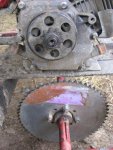
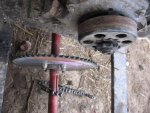
I have a predator 212 too and I just did a 10t clutch to a 60t sprocket, put chain on and ran it.
Attachments
-
 IMG_2556.JPG86.2 KB · Views: 2
 -
 IMG_2555.JPG73.9 KB · Views: 2

OzFab
Well-known member
Link doesn't work...
I've found that most of the instructons can be confusing for noobs so, let's try this:
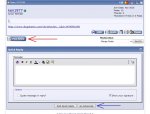
First, click on either "Post Reply" or "Go Advanced" (see pic 1).
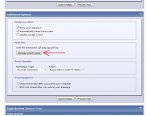
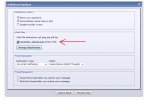
This will take you to a new page; Scroll down to the second box (Additional Options) where you will see the "Manage Attachments" button (see pic 2); clicking this will open a new, small window.
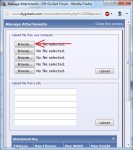
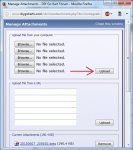
In the new window, click on the "Browse" buttons (see pic 3) to find the appropriate images to upload from your computer; once you've selected all images, click on the "Upload" button & (here's the important part) wait for the pics to upload!
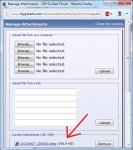
The upload window will change when the upload is complete, the file names at the top will disappear & they will appear at the bottom of the window (see pic 5) & will also appear on the main page above the "Manage Attachments" button; once this is done, scroll down & click the "Submit Reply" button...
I've found that most of the instructons can be confusing for noobs so, let's try this:
First, click on either "Post Reply" or "Go Advanced" (see pic 1).
This will take you to a new page; Scroll down to the second box (Additional Options) where you will see the "Manage Attachments" button (see pic 2); clicking this will open a new, small window.
In the new window, click on the "Browse" buttons (see pic 3) to find the appropriate images to upload from your computer; once you've selected all images, click on the "Upload" button & (here's the important part) wait for the pics to upload!
The upload window will change when the upload is complete, the file names at the top will disappear & they will appear at the bottom of the window (see pic 5) & will also appear on the main page above the "Manage Attachments" button; once this is done, scroll down & click the "Submit Reply" button...
Attachments
-
 0.jpg105.6 KB · Views: 0
 -
 1.jpg113.7 KB · Views: 0
 -
 2.jpg83.5 KB · Views: 0
 -
 4.jpg81.2 KB · Views: 0
 -
 5.jpg84.4 KB · Views: 0
 -
 6.jpg92.4 KB · Views: 0
well ken, there's your problem, as long as you cannot click the "submit reply" button on that very page the attachments will be discarded.
unfortunately that means, this is a user-side issue;
namely your browser/device your using this site with.
AS long as we don't know these details (device, browser, version where applicable)
we cannot help you solve that issue.
PC, Mac or mobile device(any ios or android tablet or phone)?
what browser are you using (internetExplorer, Firefox, Chrome, Opera, Safari or any inbuild derivate safari or chromium based)
check the settings to allow opening links in new tabs (important to not close the actual posting tab)
check your settings, and/or tell us about your device so that we can figure it out for you.
'sid
unfortunately that means, this is a user-side issue;
namely your browser/device your using this site with.
AS long as we don't know these details (device, browser, version where applicable)
we cannot help you solve that issue.
PC, Mac or mobile device(any ios or android tablet or phone)?
what browser are you using (internetExplorer, Firefox, Chrome, Opera, Safari or any inbuild derivate safari or chromium based)
check the settings to allow opening links in new tabs (important to not close the actual posting tab)
check your settings, and/or tell us about your device so that we can figure it out for you.
'sid
- Status
- Not open for further replies.