• OFF TOPIC fun forum - NO politics - NO religion - NO jerks. It's not complicated. Thanks!

Inline picture test

Status
Not open for further replies.

drffreeze

Member
Messages
41
Reaction score
0
Location
Boise, ID
Let's see if this works,

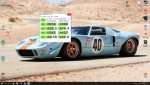
Here is a picture of our snow from 2 Winters ago (if it works). Google Drive share link did not work


Next attempt at an inline picture (if it works) Links from my Blog works =)


Regards,
Drffreeze
 
Last edited:

65ShelbyClone

Active member
Messages
680
Reaction score
179
Location
SoCal
I saw about the same reduction in boot time after going to an SSD. Mine comes up in about 20sec though. ;)
 

drffreeze

Member
Messages
41
Reaction score
0
Location
Boise, ID
Hello 65ShelbyClone,

This was my daughter's 1st-grade PC. Her computer is an old refurbished DDR3 SFF PC. I would buy the SSD to speed it up but she had to do experiments with me to see how much faster it was. We turned it into her science fair project. =)

Regards,
Drffreeze
 

65ShelbyClone

Active member
Messages
680
Reaction score
179
Location
SoCal
That's a cool idea.

My first computer's boot time was limited by the speed of the floppy drive. :lolgoku:
 

itsid

Moderator
Staff member
Messages
11,563
Reaction score
247
Location
Ruhrpott [Germany]
I saw about the same reduction in boot time after going to an SSD. Mine comes up in about 20sec though. ;)
Funny I didn't.. my win7 box boots in 1:07 from HDD and in 0:48 from SSD (both sata for fair comparision incl. bios which takes the most time here)
we talk cold start right.. not wake-up...
wake up is instantaneous
(well say my monitor lacks behind so I can't tell no other)
But in the end it needs to run fast, not boot fast for me ;)
And that it does *giggle* not overclocked at all and aircooled btw ;)

This old Clawhammer 2GB RAM (sata and even ancient IDE storages) typewriter can do 1:30 coldstart on winxp. (I'd need to disable the antivirus and some convenience tools but yeah 1:30 roughly)

I always wonder why people get so obsessed with numbers like these..
As if a computer is meant for drag racing windows..
mine need to work and that takes most part of a day and I gain nothing from it booting up more quickly..

And frankly boot times are absolutely no indication for performance.
And with the 2100 I push in Cinebench R15 CPU test
90fps for the open GL test
I'm okay.. not that that would be any relevant indicator for performance but I guess it's what kids these days look at in case they want to tach their box ;)

And yes I still rather type on this old winxp single core clawhammer
(just because it's a clawhammer I mean how cool is that codename... [/12yo off])

'sid
 

drffreeze

Member
Messages
41
Reaction score
0
Location
Boise, ID
I always wonder why people get so obsessed with numbers like these..
As if a computer is meant for drag racing windows..
mine need to work and that takes most part of a day and I gain nothing from it booting up more quickly..
That is a funny analogy. I don't think anything, at least at its conception, was purely meant to drag race. Mr. Henry Ford did not make a car for the 1/4 mile. =)

That said, in general, I optimize my systems so they do something useful for me "better". In my daughter's case, her DDR2 system had a very very old and slow HDD. It was dragging the performance of the entire system down. Boot time was just something easy for a 1st-grader to measure and understand. Here is my blog post about it. LINK

With a SSD, 8GB DDR2 memory, and a Nvidia 650 it is a perfectly capable gaming system for her.

And frankly boot times are absolutely no indication for performance.
I understand what you are saying but that still feels a little strong to me. Some systems take 2 - 5 minutes and that is an indication of an unoptimized system that probably has slow storage.

(just because it's a clawhammer I mean how cool is that codename... [/12yo off])
Clawhammer and Sledgehammer are way cool codenames! San Diego, Toledo, Windsor, not so much. LINK =)

Regards,
Drffreeze
 

itsid

Moderator
Staff member
Messages
11,563
Reaction score
247
Location
Ruhrpott [Germany]
true true... if a system takes ages to boot up, there's something fishy going on..
but more likely it's just a cluttered drive instead of a slow drive.. or worse a cluttered OS.

Even for one single machines you can essentially make boot time comparision pointless..
disable SMART scan, or remove all but one drive for that matter...
pick quick boot, disable all network controllers and peripherals etc..
quicker boot sure.. better running machine? I doubt it.
and some even essentially cheating their way to faster boot times by basically tricking windows into wakeup mode.
[and we've all seen those 'drag racing' guys, no?]

Anyways, the one single important thing in the end is:
can that computer do what it was made for?
if that's gaming then it only counts if the desired games run nicely or not.
Nothing else!

'sid
 

drffreeze

Member
Messages
41
Reaction score
0
Location
Boise, ID
Red is bad info, don't do this!
Executive Summary:
If you want to link your pictures inline from pictures on your Google Drive
1] Ensure the picture is set to share (read this LINK)
2] Copy the shareable link to the forum img tag generator but remove the "/view?usp=sharing" from the end of it (or use the "Create Direct Link" button from the above linked page)


Testing:
Another inline test from pictures that reside on my Google Drive
Did not work when put into forum img tag:
https://drive.google.com/file/d/1wbpDBF7CKyV97ZNBPEFiADtIX4BeDGog/view?usp=sharing


And another
Did work when put into forum img tag:
https://drive.google.com/uc?export=download&id=1wbpDBF7CKyV97ZNBPEFiADtIX4BeDGog
 

itsid

Moderator
Staff member
Messages
11,563
Reaction score
247
Location
Ruhrpott [Germany]
And all that is frowned upon anyways..

INSTEAD:
upload the pictures here (there's a "manage attachment" button to use for that!)
you'll find it on the reply page not in the quickreply box below though.

And the reason is simple:
over the years many many pictures got linked and eventually lost because the owner pulled them from their album, the hoster suddenly asked for big money to link images or just because
something else happened.

lost for good... annoying for everyone.

Thus.. attachments prefered.. always!

also.. a 4k resolution image isn't too welcome with mobile internet users at times.. eating up bandwidth just to show a bolt or something boring;
our pictures scale up when clicked (no noteworthy bandwidth loss when not interested in the bolt pic ;))

'sid

PS just saying.
 

drffreeze

Member
Messages
41
Reaction score
0
Location
Boise, ID
And all that is frowned upon anyways..

In a perfect world, I prefer pictures inline. I think it is easier to tell a story. That said your arguments are reasonable being that we are not in a perfect world so consider my inline picture testing dead. =)

Regards,
Drffreeze
 

itsid

Moderator
Staff member
Messages
11,563
Reaction score
247
Location
Ruhrpott [Germany]
In a perfect world, I prefer pictures inline. I think it is easier to tell a story. That said your arguments are reasonable being that we are not in a perfect world so consider my inline picture testing dead. =)

Regards,
Drffreeze

sure thing whenever you want an attached picture inline, you can.. the editor will put it where you want it

say here: 1362354876752.gif

and then go on with whatever you were doing ;)

'sid
 

drffreeze

Member
Messages
41
Reaction score
0
Location
Boise, ID
Nother test of inline pictures on this board...

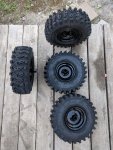
Let's say I want to put a picture of some tires right after the second SPLAT.

1] I would upload the pictures to the board via the attachment. DONE
2] I would copy the hyperlink to the picture I wanted on "Current Attachments" in the popup "Manage Attachments" window. DONE
3] Right after the "S" word I would "Insert Image" on the Message picture icon

SPLAT

Nice! Thanks itsid!

Regards,
Drffreeze
 

Attachments

  • IMG_20180507_184425.jpg
    IMG_20180507_184425.jpg
    645.5 KB · Views: 27

itsid

Moderator
Staff member
Messages
11,563
Reaction score
247
Location
Ruhrpott [Germany]
UHm ORRR which is actually the correct way of doing it (since thumbnails)

you use the paperclip Icon in the editor to embedd the picture to your post
that'll move the thumbnail into your post [inline image.. clickable]
and removes it from the "Attached thumbnails" box below your post...
(which of course vanishes in case it'd be empty..)

Like so:

[ATTACH]97265._xfImport[/ATTACH]

will show as
comic_front.jpg
(nice thumbnail size for inline view... click for a bigger image)

and as you can see it's gone from the box below now...
if I were to attach that other image inline as well
with
[ATTACH]97266._xfImport[/ATTACH]
that box would be gone
The number that needs to go between the attach-tags is the attachment ID
(you can see it by hovering over the image if you want, but the paperclip takes care of that for you)

'sid
 

drffreeze

Member
Messages
41
Reaction score
0
Location
Boise, ID
one more time =)

IMG_20180506_155201.jpg

Wow, that was so easy! /sigh

Yes, I read "How to post pics --> LINK but once I got pics to post after doing step 1 I stopped. Step 4 had what I wanted, inline picture posting. =/

Drffreeze
 
Status
Not open for further replies.
Top