Best program for go-kart design?

Status
Not open for further replies.

mysteryboy28

New member
Messages
1,582
Reaction score
10
Location
Lansing, MI
what's the best and easiest software to use to design a go-kart? i tried using google's free SketchUp, but it just wasn't very user friendly or responsive to the mouse - had to make a LOT of corrections and it became frustrating.
 

r97

Measure twice cut once
Messages
3,793
Reaction score
8
Location
Massachusetts, USA
Aside from sketch-up you're looking at purchasing some soft ware. Sold works is the first that comes to mind, although there are several well known programs. You're going to need to take time to learn how to use most any program. Some of the more expensive ones will likely make it easier to learn basic functions, but watching some tutorials and a good amount of practice with an inexpensive program like sketch-up will get you on your way.

What do you want to use the program for exactly? Just a picture to look at, something to take measurements off of, or maybe even more (stress analyses and animations)?
 

souperman000

New member
Messages
2,466
Reaction score
10
Location
Westlake Village, CA
Have you heard of Blender? I have not actualy used it myself, but the computer tacher at my old school and some of my friends have used it. makes some cool stuff. Not sure of difficulty though.
 

TheWingnut

New member
Messages
114
Reaction score
0
Location
Del Rio, TX
Well at one point i thought i might have to design and order a custom part for my old project, so i downloaded Auto Cad, you can build the part and order it. Its what they used in Myth Busters once. Worked well.
 

spookyfishlizard

New member
Messages
26
Reaction score
0
Location
Grand Ledge, MI
what's the best and easiest software to use to design a go-kart? i tried using google's free SketchUp, but it just wasn't very user friendly or responsive to the mouse - had to make a LOT of corrections and it became frustrating.

I used Google SketchUp to finish my basement and it worked great. You just have to take the time to learn to use it. You can't just jump on and go, but any software will be the same. Using software is kinda like a paint job...a good job is in 99% prep work.
 

mysteryboy28

New member
Messages
1,582
Reaction score
10
Location
Lansing, MI
i was mostly curious if there was anyone out there that had used a few different programs to design go-karts, and had found one to really get the job done that wasn't a pain in the a$$.

i'm a computer tech, so i learn stuff quickly. just found the mouse to not be cooperative (do what i wanted it to do) in SketchUp.

downloaded SolidWorks 2011 last night... will give it a try and see if it's any better than SketchUp. SolidWorks looks pretty amazing (watched a demo of making a robotic arm thingy, neato!), hopefully i don't need a degree in SolidWorks to figure it out!

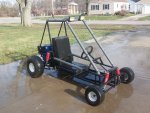
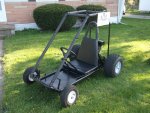
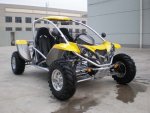
i think my fabricating skills have progressed quickly, so i'm ready to advance to the next level of building. i went from no fab skills last summer, to pretty decent skills (i think). here's my 2 karts i built to show my work, and the 3rd kart is similar to what i'd like to build next (minus the excessive plastic).
 

Attachments

  • Pads.jpg
    Pads.jpg
    483.7 KB · Views: 15
  • Pads 2.jpg
    Pads 2.jpg
    160.7 KB · Views: 14
  • 500CC-Water-Cooled-Go-Kart-with-Single-Cylinder-and-4-Stroke.jpg
    500CC-Water-Cooled-Go-Kart-with-Single-Cylinder-and-4-Stroke.jpg
    73.8 KB · Views: 16

Conker5295

New member
Messages
24
Reaction score
0
Ive done alot of work in a program called C4d (cinima 4d) its exspensive but they have a trial program that u could use for this. if u buy it it has tons of other usess as well
 

jman231994

New member
Messages
724
Reaction score
2
Location
Australia
I agree that sketchup is a pain, I honestly cant workout how to get something on the right axis when your drawing it but the move and rotate tools fix that I guess. You probably already know about it, but I know it made sketchup easier for me when I realised it. It being that you can set dimensions by typing them in as your draw something and then hitting enter. Same can be done when moving things, and the rotate tool can be locked to a direction using shift and the arrow keys. Oh and look up the follow me tool, it lets you make more complicated bars, tubes, anything really, by following guide lines
 
Status
Not open for further replies.
Top