Does Anyone know how to use AutoCAD computer program?

Status
Not open for further replies.

k-man1081

New member
Messages
20
Reaction score
0
Location
Cambridge, Ontario, Canada
Does anyone know how to use the AutoCAD program to design suspension for karts. I've seen a few videos, on YouTube.com, but they didn't show exactly how to do it. They only show the end result. There are many things to learn with that program. I just started using it as a free trial download to see if I could make a suspension system that will be best suited to my off-road buggy project design. I think it'll be far more superior than what I can do by drawing by hand.
 

landuse

Moderator
Staff member
Messages
18,740
Reaction score
505
Location
Pietermaritzburg, South Africa
Does anyone know how to use the AutoCAD program to design suspension for karts. I've seen a few videos, on YouTube.com, but they didn't show exactly how to do it. They only show the end result. There are many things to learn with that program. I just started using it as a free trial download to see if I could make a suspension system that will be best suited to my off-road buggy project design. I think it'll be far more superior than what I can do by drawing by hand.

I am sure there are a few members that would be able to give you a hand, but I am certainly not one of them. I haven't used it before for anything
 

fowler

New member
Messages
5,463
Reaction score
16
Location
Bullsbrook West Aus
Unless u get right into the weight and strength testing side of the program

No it won't be much better than what u get my hand

Unless u don't own a ruler
Maybe buy a ruler


Iv used a few versions very shortly
Only got familiar with a program called pro desktop
It was good for makeing whole frames and all components then testing there fit and travel

But it bloody slow going compared to a pencil
 

mckutzy

Well-known member
Messages
8,353
Reaction score
107
Location
bc, canada
If it is a autodesk autocad program, it will be a bit of a steep learning curve. Most of which I cant really go into in text on a forum.
There are books and other tutorials out there but unless you have bought the program, id say its pretty useless if you are just on a trial. Typically they just suck for any real use, and they all got you by the shorts for trying to build or draw something if your on a trial.

If you are skilled enough to use the paper method, (Or have a few $K to spend, then buy it and forget the trial) then use it. Get a nice flat table with a good pencil/ruler/geometry set, and use that. Also a good drawing gum eraser, STAEDTLER brand is about one of the best for drawing/drafting(or draughting for our euro folks)tools and such.
 

itsid

Moderator
Staff member
Messages
11,563
Reaction score
238
Location
Ruhrpott [Germany]
If it is a autodesk autocad program, it will be a bit of a steep learning curve. Most of which I cant really go into in text on a forum.
There are books and other tutorials out there but unless you have bought the program, id say its pretty useless if you are just on a trial. Typically they just suck for any real use, and they all got you by the shorts for trying to build or draw something if your on a trial.

If you are skilled enough to use the paper method, (Or have a few $K to spend, then buy it and forget the trial) then use it. Get a nice flat table with a good pencil/ruler/geometry set, and use that. Also a good drawing gum eraser, STAEDTLER brand is about one of the best for drawing/drafting(or draughting for our euro folks)tools and such.
:iagree:

AutoCAD is a PITA if you ask me...
I had to use it for a year or two, but that's loooong ago ( I think it was R12 to R14)

Anyways, I always felt AutoCAD being somehow counterintuitive
and I quickly swapped it to 3d studio max (discreet)
both very expensive software, and for non profit use not really recommended!

If you just want to play around with things like that, find free CAD or 3d modelling software!

I suggest
www.freecadweb.org as a CAD
and or
www.blender.org as a 3d modelling software

you can take all the time you want to learn, and in the end, you don't have to give an arm and a leg to use the software legally in the end ;)

'sid
[EDIT]

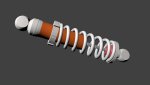
Look what I found.. a coilover dummy I made four years ago in blender...
daempfer.jpg
 

mckutzy

Well-known member
Messages
8,353
Reaction score
107
Location
bc, canada
In high school, I learned some fundamentals on r14. Later a friend gave me a copy of the 2002. I learned more from a few books I had, but just kinda worked on from there.
Just have to remember the basic drawing commands and its "pretty simple" from there.


I tried to work in 3d, and just couldnt get any where. I just didnt understand what the heck the books were talking about. I couldnt get a spring made to save my life. In 2d in multiple views I was able no prob.

I found out the best thing for autocad was to use it as kinda like a micrometer, With finding angles and offsets of bolt holes in flanges or other parts. Using known information from existing drawings I could find almost all the other info that helps in building a machine or there object.

On my bike I used it to make the frame, I however forgot to offset the measurements from the table so it got skewed. I worked it out, but it does look like almost an afterthought.
 

machinist@large

Active member
Messages
2,865
Reaction score
28
Location
West Michigan, 49331
Unless u get right into the weight and strength testing side of the program

No it won't be much better than what u get my hand

Unless u don't own a ruler
Maybe buy a ruler


Iv used a few versions very shortly
Only got familiar with a program called pro desktop
It was good for makeing whole frames and all components then testing there fit and travel

But it bloody slow going compared to a pencil

If it is a autodesk autocad program, it will be a bit of a steep learning curve. Most of which I cant really go into in text on a forum.

If you are skilled enough to use the paper method, (Or have a few $K to spend, then buy it and forget the trial) then use it. Get a nice flat table with a good pencil/ruler/geometry set, and use that. Also a good drawing gum eraser, STAEDTLER brand is about one of the best for drawing/drafting(or draughting for our euro folks)tools and such.

:iagree:

AutoCAD is a PITA if you ask me...
I had to use it for a year or two, but that's loooong ago ( I think it was R12 to R14)

Anyways, I always felt AutoCAD being somehow counterintuitive
and I quickly swapped it to 3d studio max (discreet)
both very expensive software, and for non profit use not really recommended!

If you just want to play around with things like that, find free CAD or 3d modelling software!

I suggest
www.freecadweb.org as a CAD
and or
www.blender.org as a 3d modelling software

you can take all the time you want to learn, and in the end, you don't have to give an arm and a leg to use the software legally in the end ;)

'sid
[EDIT]

Look what I found.. a coilover dummy I made four years ago in blender...
View attachment 45122

I've only walked out of two college classes in my life; one is still covered by the statues of limitations laws, the other was Auto Cad. I'm mostly self taught in Master Cam (and that was ~5 or 6 years ago), and I and several of my classmates more than proved that a Computer Aided Machining software package that was actually thought out could blow Auto Cad out of the water for most real world applications.

Auto Cad has it's place; it's just that it's place has precious little to do with anything I'll most likely ever build.
 

itsid

Moderator
Staff member
Messages
11,563
Reaction score
238
Location
Ruhrpott [Germany]
In high school, I learned some fundamentals on r14. Later a friend gave me a copy of the 2002. I learned more from a few books I had, but just kinda worked on from there.
Just have to remember the basic drawing commands and its "pretty simple" from there.


I tried to work in 3d, and just couldnt get any where. I just didnt understand what the heck the books were talking about. I couldnt get a spring made to save my life. In 2d in multiple views I was able no prob.

I found out the best thing for autocad was to use it as kinda like a micrometer, With finding angles and offsets of bolt holes in flanges or other parts. Using known information from existing drawings I could find almost all the other info that helps in building a machine or there object.

On my bike I used it to make the frame, I however forgot to offset the measurements from the table so it got skewed. I worked it out, but it does look like almost an afterthought.
very true..
the thing is, if you do not remember the tween command, you're pretty much screwed making a coil
the documentation is.. okay WAS maybe.. well pretty much worthless, and even though I knew what I had to know (because I really HAD to!)
I always found it hard to use..
yes it's a high precision instrument, and it may be worth every cent it costs.
But I couldn't get used to it.

The second I got hold of 3dstudio max I was stunned.. what ever I did in AutoCAD within a day, I was able to spit out in maybe two hours in 3ds max..
And since most of the time, all I was after was a visual representaion (aka rendering) I don't need to explain that those are easily ten times better if you can set up your own lighting scene ;)

Anyways... AutoCAD is a great tool if you can get used to it.
I couldn't
And.. it's really expensive if it's not meant to earn you a lot of money really fast.
Being a student back then I could get the much cheaper student editions, which was nice.
I'm not anymore.
And I'm not able to spend almost 2k on software every other year.

That's why I like to mention free software here.
It's good enough in 90% of all cases,
and if you cannot get used to it, uninstall it and you lost nothing but some time to try
(and maybe even learned something on the way ;))

'sid
 

rmm727

New member
Messages
621
Reaction score
7
Location
Brookville, PA
AutoCAD has its place. Mastercam has its place. Inventor/Solidworks have there place. Personally, If I had to use Mastercam to do toolpaths, I'd rather import an AutoCAD file to work from rather than draw it in there. IF all your doing is 2d work (ie laser. plasma) AutoCAD is fine. Even if you are doing a drawing for MasterCAM (on a CNC lathe/machining center) 80% of the time AutoCAD is fine. I use Inventor for some of what I do and I like it. Mostly sheet metal part design. Design the part in 3d, make it a flat pattern and export the face as a dxf. Edit as necessary and then off to the plasma table. Mastercam has a pluggin in for Solidworks so those two can work together well.

For those of you in school, Autodesk will let you download a 3 year version of most of their software packages for free. Only downfall is it has a plot banner when you print.

For those of you who last used AutoCAD in the r14 version, boy has it changed. I use 2014 version. Since '04 I believe, it is menu based so its much easier though I still am prone to typing some commands. And, a retail version of AutoCAD is about $5200 nowadays. Inventor is $7500.
 

k-man1081

New member
Messages
20
Reaction score
0
Location
Cambridge, Ontario, Canada
Wow!! After reading all that I have in this thread, I know that pencil and paper is the cheapest and easiest way to go about my project; especially with my intended purpose. Thanks guys so much for posting your experience to help others :)
 
Status
Not open for further replies.
Top